



Easy3DLaserLine
3D激光线提取与校准库
- 单激光与双激光线提取至深度图
- 便捷高效的激光三角测量系统三维校准
- 兼容Coaxlink Quad 3D-LLE与Coaxlink Quad CXP-12 3D-LLE图像采集卡
描述
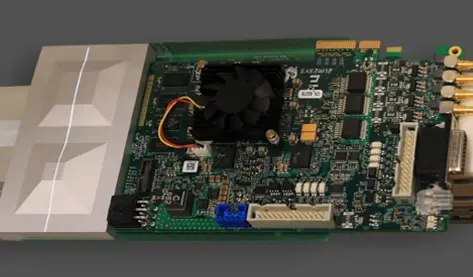
3D激光线提取至深度图
Easy3D通过分析包含激光线投影的系列图像,生成深度图。生成的深度图中每个像素点都记录了图像中激光线的位置。该软件支持多种提取模式及各类滤波器,其线提取功能与Coaxlink Quad 3D-LLE图像采集卡的硬件实现完全兼容。
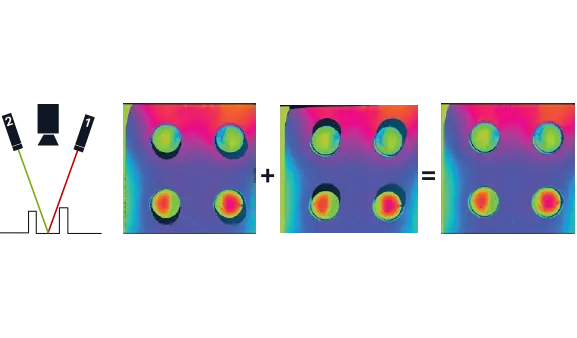
双激光线提取
通过软硬件协同实现的双激光线提取工艺,有效降低了遮挡效应的影响。当物体部分区域未被任何激光照射时,便会产生遮挡现象。采用角度不同的双激光器可显著减少这些未定义区域。Easy3DLaserLine内置的基于物体的校准功能,能够将采集的数据整合为单一校准点云。
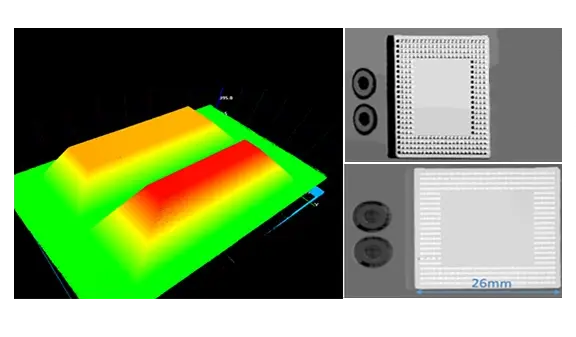
校准
某些处理可直接在深度图上进行。然而,大多数三维测量需要无失真的数据和度量表示,因此必须对激光三角测量装置进行校准。Easy3D通过计算校准模型应用于深度图,将其转换为经校准的三维点云。该校准模型基于参考物体的深度图,该深度图需通过待校准的激光三角测量装置获取。
其他福利
Neo 许可系统
Neo 是一款全新的授权系统。它可靠且技术先进,现已支持存储 eVision 和 eGrabber 授权。Neo 允许您选择在 Neo 加密狗还是 Neo 软件容器中激活授权。您先购买授权,稍后再决定。
Neo 加密狗采用坚固耐用的硬件设计,并支持在不同计算机之间灵活转移。Neo 软件容器则无需专用硬件,而是与激活它的计算机绑定。
Neo 随附专用的 Neo 许可证管理器,该管理器提供两种使用方式:直观易用的图形用户界面(GUI),以及可轻松实现 Neo 许可证流程自动化的命令行界面(CLI)。
适用于 Windows 和 Linux 的所有 eVision 库
- Microsoft Windows 11、10 适用于 x86-64(64 位)处理器架构
- Microsoft Windows 11、10 IoT Enterprise 适用于 x86_64 系统
- 适用于 x86-64(64 位)和 ARMv8-A(64 位)处理器架构的 Linux,需使用 glibc 2.18 及以上版本
eVision Studio
可以通过图形界面设计复杂的图像处理流程。这一系列工具体现了 eVision 库的多样性和强大功能。 与处理管道对应的 C++、Python 和 C# 源代码会自动生成,并为 eVision API 提供交互式文档。eVision Studio 可以处理实时图像源,例如千兆网相机、Coaxlink 图像采集卡或 eGrabber 记录仪序列。
该应用程序免费提供,可在 Windows 和 Linux 系统上运行,并兼容 Intel 和 ARM 64 位架构。
Software
- Host PC Operating System
-
eVision is a set of 64-bit libraries that require an Intel compatible processor with the SSE4 instruction set or an ARMv8-A compatible processor.
eVision can be used on the following operating systems:
Microsoft Windows 11, 10 for x86-64 (64-bit) processor architecture
Microsoft Windows 11, 10 IoT Enterprise for x86-64 systems
Linux for x86-64 (64-bit) and ARMv8-A (64-bit) processor architectures with a glibc version greater or equal to 2.18
Remote connections
Remote connections are allowed using remote desktop, TeamViewer or any other similar software.
Virtual machines
Virtual machines are supported. Microsoft Hyper-V, Oracle VirtualBox and libvirt hypervisors have been successfully tested.
Only the Neo Licensing System is compatible with virtualization.
Minimum requirements:
2 GB RAM to run an eVision application
8 GB RAM to compile an eVision application
Between 100 MB and 2 GB free hard disk space for libraries, depending on selected options.
- APIs
-
Supported programming languages :
The eVision libraries and tools support C++, Python and the programming languages compatible with the .NET (C#, VB.NET)
C++ requirements: A compiler compatible with the C++ 11 standard is required to use eVision
Python requirements: Python 3.11 or later is required to use the Python bindings for eVision
.NET requirements: .NET framework 4.8 (or later) or the .NET platform 6.0 (or later) are supported
Supported Integrated Development Environments:
Microsoft Visual Studio 2017 (C++, C#, VB .NET, C++/CLI)
Microsoft Visual Studio 2019 (C++, C#, VB .NET, C++/CLI)
Microsoft Visual Studio 2022 (C++, C#, VB .NET, C++/CLI)
QtCreator 4.15 with Qt 5.12
Ordering Information
- Product status
-
Released
- Product code - Description
-
PC4186 Open Easy3DLaserLine for USB dongle
PC4336 Open eVision Easy3DLaserLine
- Included libraries
-
Easy3D
Easy3DLaserLine
- Related products
-
PC1637 Coaxlink Quad 3D-LLE
PC6512 eVision/Open eVision USB Dongle (empty)
PC6514 Neo USB Dongle (empty)

